Download trade history : Export to CSV file

Oct 26, 2025 at 00:07
2,087 Tampilan
3 Balasan

Menjadi Anggota Sejak Jun 20, 2020
5 postingan
Oct 26, 2025 at 00:07
(diedit Oct 26, 2025 at 00:08 yang lalu)
Hello everyone, Is there a way to download or export a system’s trade history as a CSV file?

Menjadi Anggota Sejak Oct 08, 2025
20 postingan
Nov 02, 2025 at 17:54
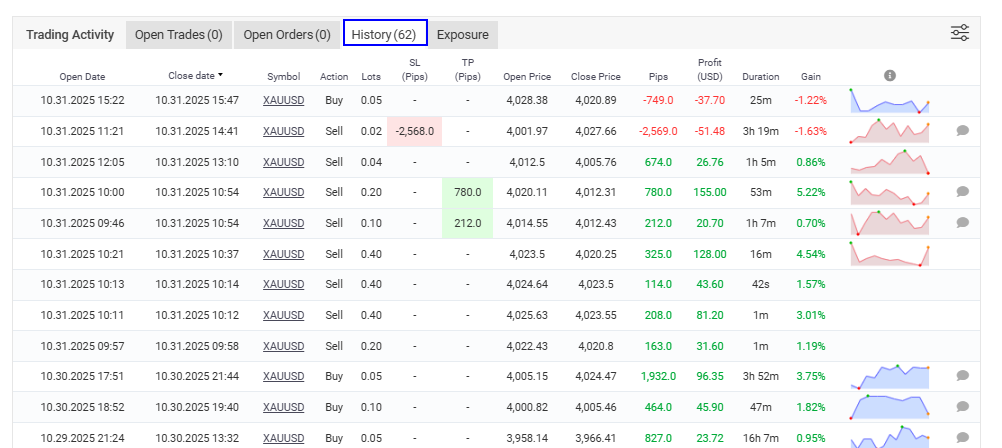
Hey there 👋 yes, you can!Go to the “Portfolio” tab, open the system you want, then click “History”.At the top-right corner of the trade list, you’ll see an “Export” option — select CSV to download the full trade history.
If you don’t see the button, try switching to desktop mode (it doesn’t show on mobile sometimes).
Hope that helps! ✅
Global Trading - Trusted Capital
Menjadi Anggota Sejak Jun 20, 2020
5 postingan
Nov 02, 2025 at 19:05
Thank you for your answer! I was actually referring to the trade history of public systems on Myfxbook, not my own. As far as I descovered, we can’t export public trade history from Myfxbook the same way we can from the MQL5 Signals section.

*Penggunaan komersial dan spam tidak akan ditoleransi dan dapat mengakibatkan penutupan akun.
Tips: Memposting URL gambar/YouTube akan otomatis menyematkannya di postingan Anda!
Tips: Ketik tanda @ untuk melengkapi nama pengguna secara otomatis yang berpartisipasi dalam diskusi ini.