MyFxBook EA and Metatrader 4 - Build 600


Menjadi Anggota Sejak Jan 21, 2012
9 postingan
Feb 05, 2014 at 15:09
After update to build 600 myfxbook EA not working. Doesn't update my account.

Menjadi Anggota Sejak Nov 21, 2011
1601 postingan
Feb 05, 2014 at 15:45
I think i have the same problem... I'm going to contact Myfxbook

Menjadi Anggota Sejak Nov 11, 2010
9 postingan
Feb 05, 2014 at 15:59
I've got the same issue - I can see a 'Can't open file' error in the logs even though I've placed the .ex4 and .dll in the new Experts and Libraries folders (via the File Open Data) option in MT4 ( as simply putting them in the MQL4/Experts and MQL4/Libraries files means they are not picked up).
Also tried running the actual MyFxBook EA installer with same issue - I suspect it needs updated to look for files in the correct place due to the new directory structure.
Also tried creating the old directory structure and putting the DLL in there but to no avail.
Gary.
Also tried running the actual MyFxBook EA installer with same issue - I suspect it needs updated to look for files in the correct place due to the new directory structure.
Also tried creating the old directory structure and putting the DLL in there but to no avail.
Gary.

Menjadi Anggota Sejak Jun 03, 2010
675 postingan
Feb 05, 2014 at 17:58
Most normal thing - whats newer, thats is worse :)
PAMM MANAGER // Professional Fund Manager
Menjadi Anggota Sejak Oct 29, 2010
3 postingan
Feb 05, 2014 at 21:02
same here whats happening myfxbook?
Menjadi Anggota Sejak Nov 21, 2011
1601 postingan
Feb 05, 2014 at 22:06
It's only MetaQuotes the pb. The new version released is just really stupid.
Menjadi Anggota Sejak Jun 01, 2012
18 postingan
Feb 05, 2014 at 23:44
I have the same issue also - hopefully myfxbook fix it soon.
Menjadi Anggota Sejak Jun 01, 2012
18 postingan
Feb 05, 2014 at 23:48
Has anyone tried the publisher with Build 600? If so, does it work?
Menjadi Anggota Sejak Jan 21, 2012
9 postingan
Feb 06, 2014 at 04:36
(diedit Feb 06, 2014 at 05:03 yang lalu)
I think problem in myfxbook EA. Because this EA doesn't work in metatrader 5 language. In new 600 build all old indicators and EA not working if they not suitable for metatrader 5 language. Attemt to establish connection via myfxbook FTP was not succesfull too. Everytime I got "wrong login or password" message. So, could anyone write about it to myfxbook staff?

Menjadi Anggota Sejak Jul 31, 2009
1426 postingan
Feb 06, 2014 at 07:30
Hi Guys,
A new version was released last week (which works on build 600) - please download it here:
https://static.mfbcdn.net/pages/EaInstaller.exe
A new version was released last week (which works on build 600) - please download it here:
https://static.mfbcdn.net/pages/EaInstaller.exe

Menjadi Anggota Sejak Sep 19, 2011
6 postingan
Feb 06, 2014 at 07:30
I read in "MetaTrader 4 Build 600 with Updated MQL4 Language and Market of Applications Released"
https://forum.mql4.com/60555
"f MQL4 programs contain DLLs for passing/accepting price data, the corresponding functions in the source codes should be rewritten and recompiled considering format changes to ensure proper operation.
Old EX4 applications and DLLs based on old RateInfo format will not work in the new terminal. Conversion to the new format is required."
Probably, the problem is because the DLL used by MyfxbookEA can't be used in the new MT4 build.
https://forum.mql4.com/60555
"f MQL4 programs contain DLLs for passing/accepting price data, the corresponding functions in the source codes should be rewritten and recompiled considering format changes to ensure proper operation.
Old EX4 applications and DLLs based on old RateInfo format will not work in the new terminal. Conversion to the new format is required."
Probably, the problem is because the DLL used by MyfxbookEA can't be used in the new MT4 build.
Menjadi Anggota Sejak Sep 19, 2011
6 postingan
Feb 06, 2014 at 07:30
tcollings posted:
Has anyone tried the publisher with Build 600? If so, does it work?
Yes, MT4 publisher works on my end.

forex_trader_172400
Menjadi Anggota Sejak Jan 17, 2014
14 postingan
Feb 06, 2014 at 07:31
Confirmed. Build 600 and Myfxbook EA works fine😎

Menjadi Anggota Sejak May 01, 2013
5 postingan
Feb 06, 2014 at 07:37
Me too... =(
El control del riesgo sobre la evolución inmediata para perpetuar el progreso

Menjadi Anggota Sejak Jul 11, 2011
27 postingan
Feb 06, 2014 at 07:37
same here
K.Disi
Menjadi Anggota Sejak Aug 24, 2010
33 postingan
Feb 06, 2014 at 10:57
I run the latest version 1.6 and it does to install a dll file. Where is the dll file? It's not in the \libraries directory.
"The market can stay irrational longer than you can stay solvent." - John Keynes
Menjadi Anggota Sejak Nov 11, 2010
9 postingan
Feb 06, 2014 at 11:16
(diedit Feb 06, 2014 at 11:23 yang lalu)
Staff posted:
Hi Guys,
A new version was released last week (which works on build 600) - please download it here:
https://static.mfbcdn.net/pages/EaInstaller.exe
Hi, I did try this 'new' installer but I can see that it put the .ex4 & .dll files in the old experts & experts\libraries folders which still exist after the build 600 update. Even manually coying them into the new folders (via MT4 File Open Data Folder) does not work. The EA is poicked up and found, the log shows successful MyFxBook publishing and the MyFxBook site also says updated x mins ago successfully BUT THE LATEST TRADE HISTORY IS NOT PUBLISHED SINCE THE BUILD 600 UPDATE TOOK PLACE.
So I think there is still anissue with the EA.
All the best,
Gary.
Menjadi Anggota Sejak Jun 01, 2012
18 postingan
Feb 06, 2014 at 11:19
Didn't work for me either. WHen I ran the installer however, I couldn't see the ex4 or dll files in either folders (ie: old and new), although the installer said it worked successfully.
Menjadi Anggota Sejak Nov 21, 2011
1601 postingan
Feb 06, 2014 at 11:49
I just tried it and it works fine.
Now Dll files are included into the EA.
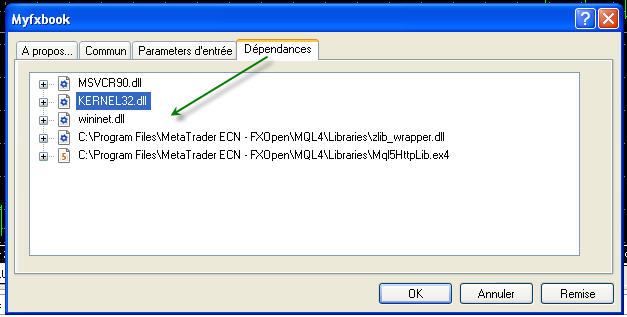
Now Dll files are included into the EA.
Lampiran: